Editor Setup
Your editor can suggest every script function and every native while you type, show what it does and warn you about wrong arguments. All it needs is one definitions file.
| File | For | Works with |
|---|---|---|
| hmp-definitions.lua | Lua resources | Lua Language Server (VS Code extension Lua by sumneko, Neovim, IntelliJ, ...) |
| hmp-definitions.d.ts | JavaScript resources | VS Code and every editor with TypeScript support |
Both files are built from the list of script functions and the natives every time the website updates. Download them again now and then to get new functions and descriptions.
What you get
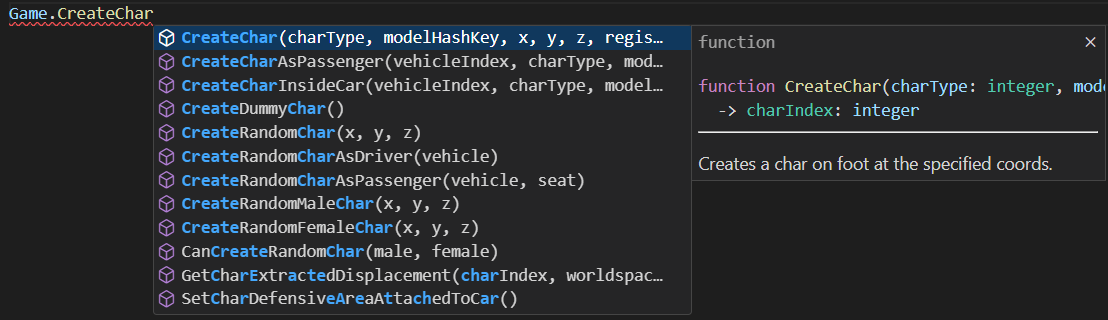
Every native and script function is suggested with its parameters and description:
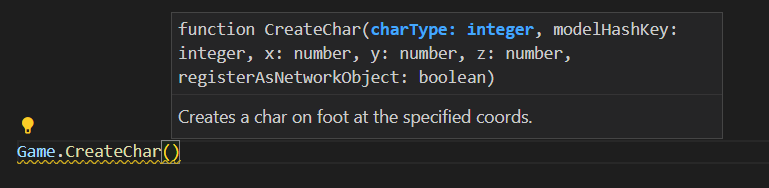
While you type the call, the editor shows the parameters and their types:
A wrong argument is marked before you even start the server:
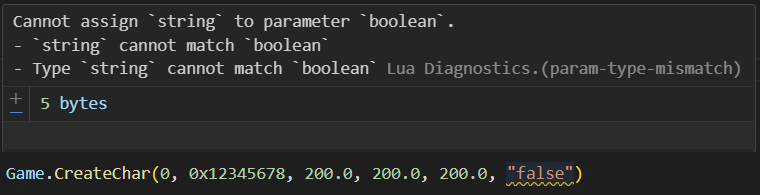
The screenshots show Lua with the Lua Language Server. JavaScript in VS Code works the same way.
Set up VS Code
Open your server folder in VS Code (File → Open Folder), the one with settings.xml and the
resources folder. Create a folder definitions in it and put the downloaded file there. Keep it
out of your resources: it is only for the editor.
├── definitions/
│   ├── hmp-definitions.lua
│   └── hmp-definitions.d.ts
├── resources/
├── .luarc.json
├── jsconfig.json
└── settings.xml
- Lua
- JavaScript
- Install the extension Lua by sumneko (the Lua Language Server).
- Create a file
.luarc.jsonin the server folder:
{
  "$schema": "https://raw.githubusercontent.com/LuaLS/vscode-lua/master/setting/schema.json",
  "runtime.version": "Lua 5.5",
  "workspace.library": ["definitions"]
}
- Open any
.luafile of a resource and typeGame.orChat.: the suggestions appear.
VS Code reads the definitions without an extension.
- Create a file
jsconfig.jsonin the server folder:
{
  "compilerOptions": {
    "checkJs": true,
    "target": "es2022",
    "lib": ["esnext"]
  },
  "include": ["resources/**/*.js", "definitions/hmp-definitions.d.ts"]
}
- Open any
.jsfile of a resource and typeGame.orChat.: the suggestions appear.
checkJs also marks wrong argument types. Leave it out if you only want the suggestions.
Good to know
- Client and server: Each script function says whether it works on the client, the server or
both (Client, Server, Shared). The editor cannot tell which side a file runs on, so it
suggests all of them. Natives (
Game.…) only work on the client. - Several results: Natives that hand back more than one value return several values in Lua and an array in JavaScript, see Game functions.
- Missing or wrong description? The texts come from the natives repository. Every native page has an Edit on GitHub link.